
Logging in
To log on to the administration portal open the following URL in your browser, the URL is the FileCap IP/hostname followed by /FileCap/admin (For example: https://10.10.10.10/FileCap/admin).
The default login credentials for the management portal are:
Username: filecap
Password: FileCap123

Logging out
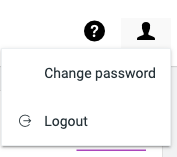
To log out of the administration portal you can click the icon in the right-top corner and select “Logout”.
 FileCap
You must be logged in to post a comment.